From a sentenceto a solid.
A complete parametric CAD studio in your browser, with Genie inside. Describe a part, watch it built on a real CAD kernel one checked step at a time, then change anything yourself.
- Exact B-rep geometry
- Nothing to install
- Free plan
- 01Exact geometryA real B-rep CAD kernel (OpenCASCADE) under every feature, to the thousandth of a millimetre.
- 02Genie checks its workEvery size Genie builds is measured on the model before the part is handed back.
- 03Nothing to installOpen a link on any laptop or desktop. Your designs are saved as you work.
- 04Your files, your waySTEP, IGES and STL in and out — and .dxg, the whole document in one file.
Watch it build.
Change your mind anytime.
Recorded in the editor, nothing staged. Genie works in the open: every step it finishes and checks shows on the part and in the feature tree. Say stop and it keeps what it has built; type a new message and it carries on from there.
Everything a design needs.
In a browser tab.
The tools of desktop CAD, without the install: sketch, model, assemble, draw, simulate and make.
Constraints and dimensions drive the geometry, and the solver shows what is still free to move.
Extrude, revolve, sweep, loft, fillet, shell, patterns — more than 60 tools, all exact solids.
Mates that move like the real thing — revolute, slider, fastened — with clashes checked.
Views, sections, dimensions and a live bill of materials, ready to print.
Static, modal and thermal analysis right on the part, with the results on the model.
Sheet-metal flat patterns, CAM toolpaths and slicing for 3D printing.
Bring your files.
Take everything with you.
Open the models you already have, export exact geometry for any other tool, or keep the whole document in one .dxg file: every feature, named version and imported file, editable again.
- Bring in
- STEP · IGES · BREP · DXF · STL · OBJ · .dxg
- Take out
- STEP · STL · OBJ · PNG · .dxg
Your designs
stay yours.
Start free.
Grow when you need to.
The whole CAD studio is in every plan. Plus and Pro give Genie more room and your designs more space.
- The full CAD studio
- Genie, with a small allowance each session, day and month
- 200 MB of cloud storage
- STEP, STL, OBJ and .dxg files
- Everything in Free
- About twice Free's Genie use a month
- Larger Genie sessions and days
- 1 GB of cloud storage
- Everything in Plus
- About ten times Free's Genie use a month
- Much larger Genie sessions and days
- 5 GB of cloud storage
Prices in Indian rupees, billed monthly through Razorpay (UPI and cards). Cancel anytime: your plan runs to the end of the month you paid for. Genie's allowance resets each session, day and month.
See Genie at work.
Real recordings, step by step.
Parts from a sentence or a drawing, whole products, quick changes, measured checks and simulation: what each one looks like, and what it saves you.
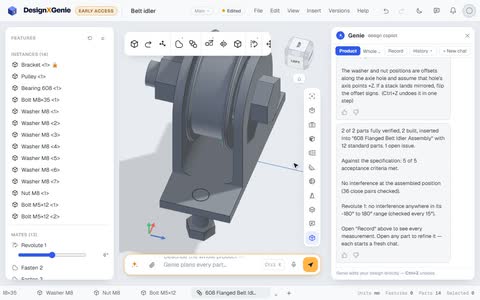 A belt idler from one sentence: pulley, bearing, bolt and bracketProduct mode turns one sentence into a checked assembly. Genie designs the bracket and the flanged pulley, picks the 608 bearing and the M8 hardware from the catalogue, mates it so the pulley turns, and checks a full turn for clashes.
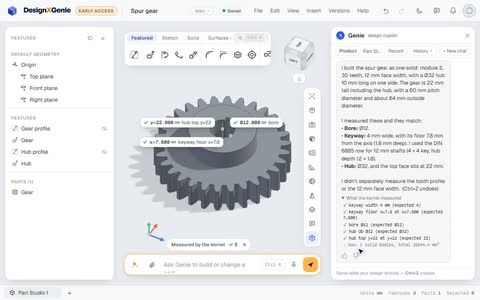 A spur gear with a DIN 6885 keyway, in about half a minuteModule, tooth count, face width, bore, keyway and hub in one sentence. Genie builds a real involute spur gear, takes the keyway from the standard, and the kernel measures the bore, the keyway and the hub.
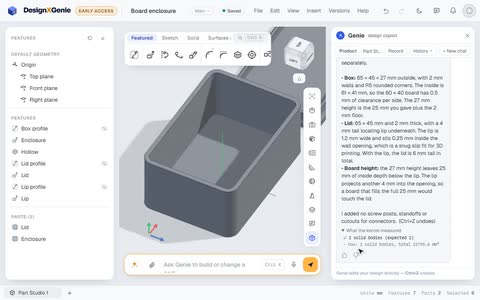 A 3D-printed enclosure for a circuit board, with a lid that locatesGive Genie the board's size and it designs the box and the lid around it, with print-friendly clearances, and tells you what it left out: screw posts, standoffs and connector cut-outs.
Questions
Yes. The Free plan has the whole CAD studio, a small Genie allowance and 200 MB of storage. Plus and Pro add more Genie use and more storage when you need them.
No. It runs in your browser on a laptop or desktop computer; Chrome and Edge work best. On a phone you can look around your designs, but modelling works best on a computer.
Genie builds every step on the same CAD kernel you use, then measures it — sizes, volumes, holes, gaps — and only hands back a change that checks out. The measurements are listed under its answer.
Yes. You watch it build step by step. Stop keeps what it has built and checked, a new message makes it carry on from there, and Ctrl+Z takes its steps back.
Open STEP, IGES, BREP, DXF, STL and OBJ. Export exact STEP, STL for 3D printing, OBJ and PNG — or a .dxg file with the whole document, editable again.
In your account, on Google Cloud, encrypted at rest and saved as you work, with named versions to go back to. You can download any document as a .dxg file at any time.
Plus and Pro are monthly plans in Indian rupees, paid through Razorpay with UPI or a card. Cancel anytime; the plan stays on until the end of the month you paid for.
Write to us from the contact page — we read every message.
Put Genie to work.
Describe your first part tonight. It's free.



